DesignCraft open-source page layout, typography, and publishing

DesignCraft is an open-source page-layout and publishing application written in Rust. It targets multi-page design with text frames, threaded stories, styles, color, graphics, tables, long-document tools, PDF output, IDML exchange, and automation. Its concepts are familiar to InDesign users, but the project's own roadmap still identifies it as pre-alpha.

Status
Pre-alpha
Workflow
page layout and publishing
Platforms
Windows · macOS · Linux · FreeBSD · Web
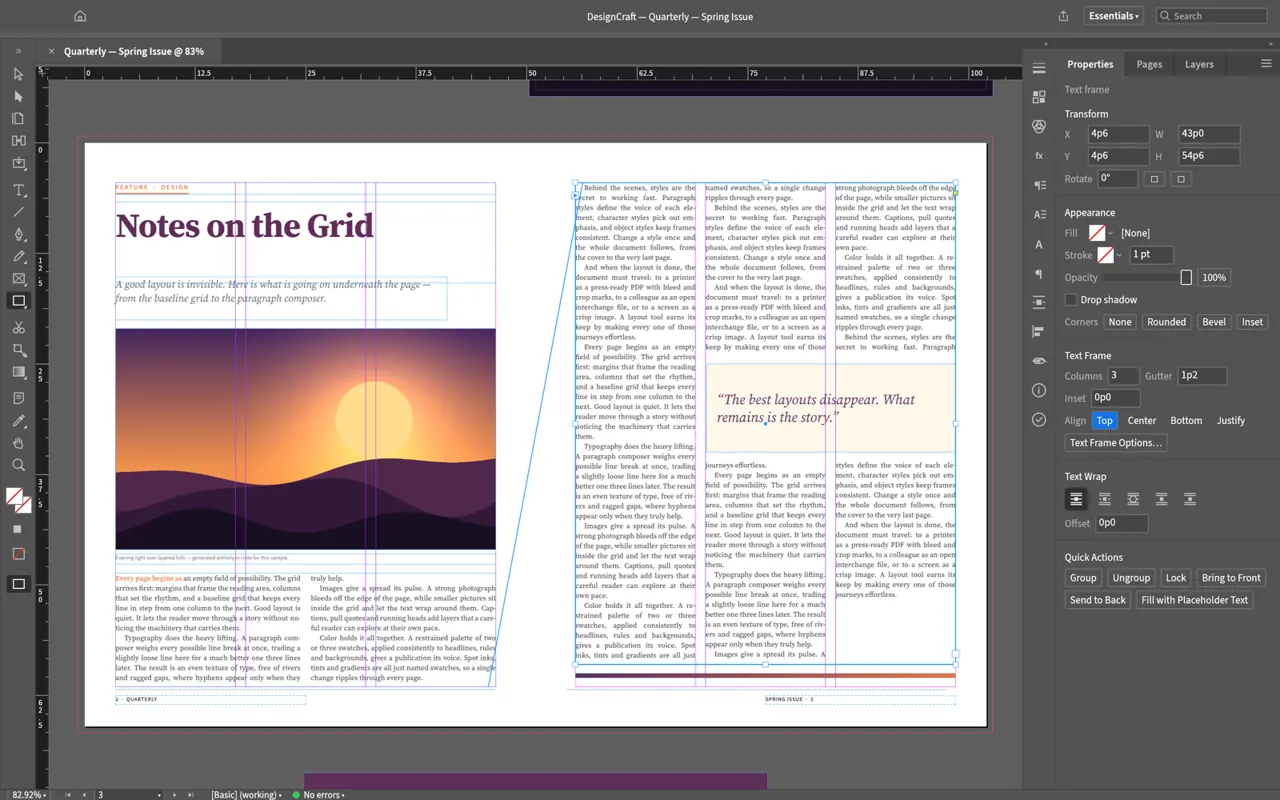
DesignCraft editing a threaded magazine spread with page layout and text controls
Official DesignCraft project screenshot. View source ↗

DesignCraft features worth testing first.

DesignCraft has a substantial feature surface while important workflow blockers and compatibility gaps remain. Treat it as a promising testing environment, not a default replacement for an established print or publishing pipeline.

Compose pages and spreads in DesignCraft

Create documents with pages, spreads, margins, columns, frames, guides, graphics, layers, parent-page concepts, and layout controls. Test selection, snapping, text-frame behavior, pasteboard work, and multi-page navigation on a real publication.

Shape long-form typography in DesignCraft

Thread stories through frames, use character and paragraph styles, control composition, hyphenation, spacing, columns, wrapping, lists, notes, tables, and multilingual text. Font services, IME behavior, and edge-case composition still require verification.

Prepare structured publications in DesignCraft

Use sections, contents, indexes, footnotes, books-related features, links, data merge, interactive output, and preflight-oriented tools where available. Depth varies, so each deliverable type needs its own acceptance checklist.

Exchange, export, and automate in DesignCraft

DesignCraft documents its own open format, IDML workflows, PDF and image output, web builds, commands, CLI scripting, and MCP control. Native INDD exchange and some commercial publishing integrations should not be assumed.

The right DesignCraft trial is a short but realistic publication: a cover, a multi-column feature, threaded text, images with links, paragraph and character styles, a table, page numbers, a contents entry, bleed, and a print-ready PDF. Open or rebuild it, change copy, relink an image, export, reopen the document, and inspect the PDF in a separate preflight-capable tool.

Page-layout migrations fail in small details: overset text, changed line breaks, missing fonts, altered master items, broken links, wrong bleeds, spot-color changes, and inaccessible structure. Keep the original package, preserve fonts and linked assets according to their licenses, and compare page by page before DesignCraft becomes the source of truth.

Download DesignCraft from the official source.

This independent guide does not host installers. The buttons below open the project's GitHub pages, where the maintainers publish assets, checksums, release notes, source code, and known limitations.

  • Use the official DesignCraft Releases page and verify that the required platform package is actually published.
  • Read the roadmap and open issues for IDML, typography, fonts, clipboard, startup, print, and export limitations.
  • Test a packaged copy of a small publication before opening a client archive or relying on exported PDFs.

Validate DesignCraft, not just the download.

A layout application is only ready when the document survives editing, reopening, packaging, export, and handoff. Build a compact test publication with parent pages, threaded stories, local overrides, paragraph and character styles, a table, anchored graphics, image links, page numbers, contents, bleeds, and the fonts used by your real work. Change copy enough to force reflow, relink an image, export an IDML package and a print PDF, then inspect every page outside the editor. Look for overset text, substituted glyphs, altered line endings, missing links, incorrect color, transparency changes, and wrong trim or bleed geometry. Check the packaged fonts and links on a second machine, and ask the intended printer to inspect a proof before treating the export preset as approved. Keep InDesign and the original package available until DesignCraft passes this complete loop for the publication type you intend to produce.

DesignCraft vs Adobe InDesign: what changes?

This is a workflow comparison, not a claim of complete feature parity. Use the final column as a test plan before moving real work.

AreaDesignCraftAdobe InDesignWhat to verify
Page constructionDesignCraft provides pages, spreads, frames, guides, styles, layers, graphics, tables, and layout controls in an open application.InDesign is the mature professional reference for print, editorial, packaging, and digital publishing workflows.Recreate a representative spread and compare selection, snapping, reflow, linked assets, and exported geometry.
TypographyThreaded stories, styles, composition, multilingual text, tables, and long-document tools are present with documented gaps.InDesign has a deeply refined composition engine, font ecosystem, scripting model, and extensive production history.Compare line endings, overset text, hyphenation, justification, OpenType behavior, vertical text, and IME input.
File compatibilityDesignCraft uses an open native direction and supports IDML-oriented workflows plus PDF and image export.InDesign owns INDD and is the expected source for many agencies, printers, publishers, and template vendors.Use IDML and PDF as explicit handoff formats; do not promise native INDD continuity without proof.
Prepress and publishingPrint, PDF, preflight, contents, indexes, data merge, interactive output, and long-document features vary in depth.InDesign has mature packaging, preflight, PDF presets, color-management, accessibility, print, and publishing integrations.Validate bleeds, marks, output intent, fonts, inks, tags, links, and printer requirements outside the layout app.
Automation and ownershipCommand scripts, CLI operations, MCP, web builds, and documented formats make inspectable automation a project goal.InDesign offers scripts, plug-ins, data-driven publishing, commercial support, and Creative Cloud services.Choose the system whose automation can be maintained and whose output can be checked by the final production partner.

Comparison sources: the official DesignCraft repository, its public roadmap, and the official Adobe InDesign product page. Product behavior changes; verify the current release before publishing a conclusion.

Should you use DesignCraft now?

The honest answer depends on the cost of a failed import, edit, save, handoff, or export—not on how similar the interface looks.

A practical fit

Try DesignCraft when…

  • Designers learning or testing an open-source multi-page layout workflow.
  • Independent publications that can review every page and exported PDF before release.
  • Developers researching scriptable, web-capable, or agent-driven publishing systems.
A reason to wait

Keep InDesign in the loop when…

  • Studios that require native INDD round trips or depend on commercial InDesign plug-ins and scripts.
  • Complex multilingual, book, packaging, accessibility, or prepress jobs without time for detailed validation.
  • Deadline-critical publications where a pre-alpha clipboard, font, startup, or composition issue is unacceptable.
Use a reversible migration.

Keep originals, duplicate the working file, record the application and release used, compare exports in an independent viewer, and retain the old tool until the complete delivery loop has passed. A successful first launch proves installation; it does not prove compatibility, recoverability, or production readiness.

DesignCraft questions before you download.

Short answers for the decisions that should happen before an installer reaches your production machine.

Is DesignCraft a free InDesign alternative?

DesignCraft is free and open source and targets page layout and publishing, but the official roadmap still identifies it as pre-alpha. Use it for testing and suitable self-contained work only after validating the exact document.

Where can I download DesignCraft?

Use the official storytold/designcraft GitHub Releases page. If a suitable release asset is not available, follow only the official source-build instructions rather than using an unknown mirror.

Can DesignCraft open INDD files?

Do not assume native INDD compatibility. The project documents IDML and its own format direction; verify the current repository for the exact import and export path required by your document.

Can DesignCraft export print PDFs?

PDF output and print-oriented features are documented, but a professional result still needs external checks for fonts, bleeds, marks, color, transparency, tags, standards, and the printer's specification.