EffectCraft open-source motion graphics, compositing, and rendering

EffectCraft is an open-source motion graphics and compositing application written in Rust. Its project, composition, layer, keyframe, graph, text, shape, mask, effect, three-dimensional, preview, and render concepts deliberately resemble a professional motion-design workspace. It also treats commands, headless rendering, and agent control as core architecture rather than an afterthought.

Status
Alpha
Workflow
motion graphics and compositing
Platforms
Windows · macOS · Linux · FreeBSD · Web
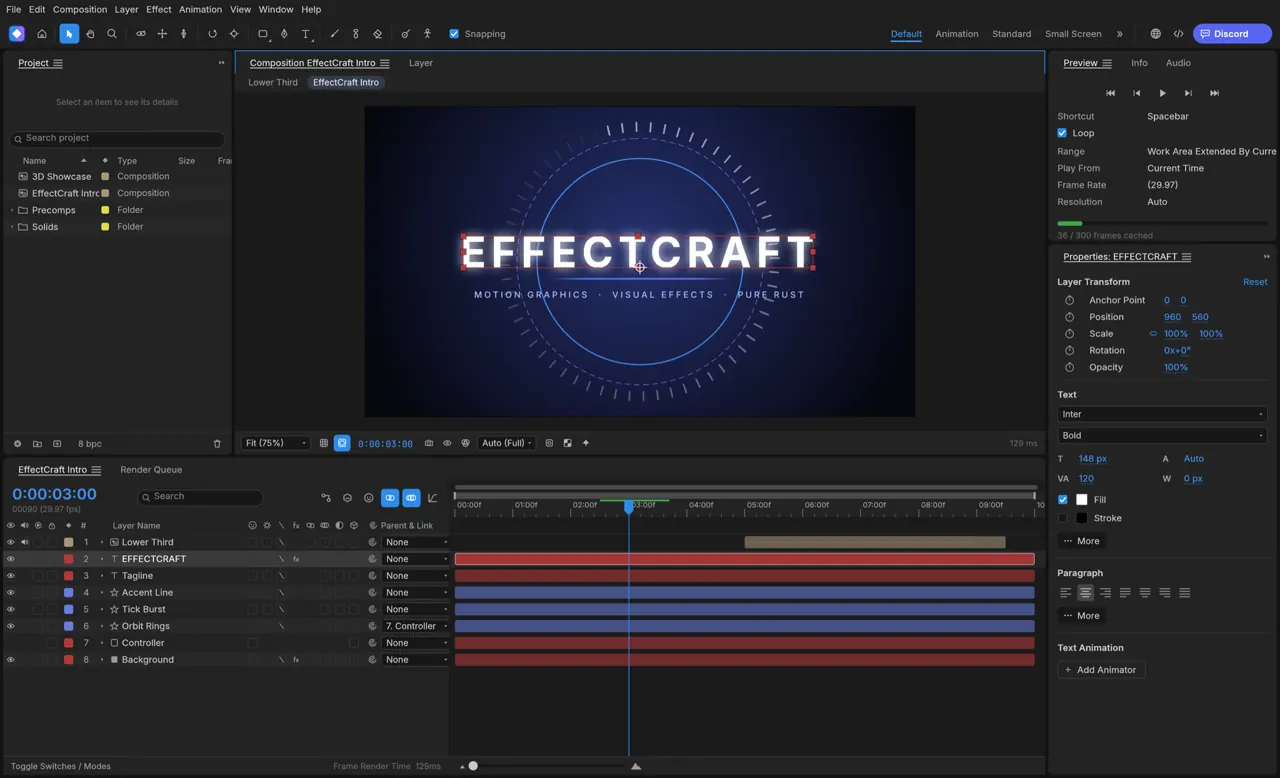
EffectCraft main window with composition, project panel, layered timeline, and text properties
Official EffectCraft project screenshot. View source ↗

EffectCraft features worth testing first.

EffectCraft is alpha software. The feature surface is broad, but readiness, performance, format fidelity, plug-in compatibility, localization, and stability are not equivalent to After Effects. Production suitability must be proven with the exact composition and output path.

Animate compositions and layers in EffectCraft

Create compositions, arrange footage and generated layers, keyframe properties, edit curves in a graph editor, follow motion paths, and manage timing in a layered timeline. Validate interpolation, time remapping, parenting, nested compositions, and undo on a real shot.

Composite with effects and masks in EffectCraft

Combine transforms, blend modes, mattes, masks, tracking, roto-related tools, color operations, simulations, particles, and a large catalog of effects. Matching an effect name does not guarantee identical pixels, defaults, performance, or project exchange.

Work with type, shapes, and 3D in EffectCraft

Build text and shape layers, animate their properties, place layers in three-dimensional scenes, add cameras and lights, and use render controls. Compare text shaping, motion blur, shadows, depth, color, and cached playback before approving a template.

Render and automate in EffectCraft

Use the render queue, command-line renderer, control channel, and MCP server for repeatable or agent-driven work. Automation can inspect projects and rendered frames, but final review should still include the actual encoded output at delivery resolution.

Evaluate EffectCraft with a compact composition that represents your daily work: imported footage, a nested composition, animated text, a mask, one track or stabilization task, a particle or blur effect, motion blur, audio, and the final delivery codec. Render a short section, reopen the project, and compare frames, timing, color, alpha, and audio outside the application.

The most interesting differentiator is the shared command system across the interface, CLI, and MCP server. That makes repeatable renders, inspection, and controlled agent operations possible. It does not make autonomous output trustworthy by itself. Grant access only to a test workspace, save versions, render previews, and require a human check before an automated composition enters a client pipeline.

Download EffectCraft from the official source.

This independent guide does not host installers. The buttons below open the project's GitHub pages, where the maintainers publish assets, checksums, release notes, source code, and known limitations.

  • Open the official EffectCraft Releases page and choose the installer or archive for your platform and processor.
  • Read release notes and known issues for GPU, codec, web, plug-in, and project-compatibility limitations.
  • Test on a copied project, render a representative segment, and compare the exported media in an independent player.

Validate EffectCraft, not just the download.

Motion graphics testing has to reach a rendered frame. Assemble a short composition with nested timing, animated type, masks, parenting, a tracked element, motion blur, transparency, audio, and the effects that define your actual style. Preview it, save, restart, reopen, change one upstream property, and render both an image sequence and your delivery codec. Compare frame boundaries, color, alpha, font shaping, interpolation, cache behavior, audio sync, and the final file duration outside the application. If automation matters, repeat the same render from the command line in a restricted test folder. This procedure separates an attractive interface from a recoverable production workflow and shows which EffectCraft limitations are relevant to your work today.

EffectCraft vs Adobe After Effects: what changes?

This is a workflow comparison, not a claim of complete feature parity. Use the final column as a test plan before moving real work.

AreaEffectCraftAdobe After EffectsWhat to verify
Compositions and animationEffectCraft implements a composition-and-layer model with keyframes, graphs, motion paths, parenting, text, shapes, masks, and three-dimensional controls.After Effects is the mature industry reference with deeply refined animation behavior, templates, expressions, and production conventions.Rebuild one real shot and compare timing, interpolation, nesting, motion blur, and rendered pixels.
Effects and trackingA broad effect catalog, tracking tools, particles, simulations, roto-related features, and GPU or CPU paths are documented.After Effects has a mature first-party toolset plus a major commercial plug-in and preset ecosystem.Test the exact effects and trackers at delivery resolution; names alone do not prove parity.
Project and format exchangeEffectCraft uses its own project workflow and documents media import and export paths; native AEP compatibility should not be assumed.After Effects owns the AEP ecosystem and integrates with other Adobe applications and common motion pipelines.If a collaborator needs AEP, a plug-in, Dynamic Link, or a specific template, keep that requirement explicit.
Preview and renderPreview, caching, render queue, command-line output, web builds, and multiple codec paths are active development areas.After Effects has established rendering, color, hardware, media, and farm workflows backed by long production use.Benchmark the real comp on your hardware and inspect the encoded deliverable, not only the interactive preview.
Automation and ownershipOpen code, CLI commands, a control channel, MCP, and sandboxed plug-in work make automation a central design goal.After Effects supports expressions, scripts, panels, plug-ins, templates, and commercial integrations.Select the extension model your team can secure, debug, and support when project files or renders change.

Comparison sources: the official EffectCraft repository, its public roadmap, and the official Adobe After Effects product page. Product behavior changes; verify the current release before publishing a conclusion.

Should you use EffectCraft now?

The honest answer depends on the cost of a failed import, edit, save, handoff, or export—not on how similar the interface looks.

A practical fit

Try EffectCraft when…

  • Motion designers experimenting with an open, scriptable compositor on supported platforms.
  • Short self-contained pieces where every render can be inspected before publication.
  • Technical teams researching headless rendering, MCP control, or reproducible motion pipelines.
A reason to wait

Keep After Effects in the loop when…

  • Studios dependent on AEP exchange, proprietary plug-ins, templates, or Dynamic Link.
  • Long, heavy, color-critical, or deadline-critical compositions without time for validation.
  • Pipelines that require proven farm rendering, collaboration, support, and archive compatibility.
Use a reversible migration.

Keep originals, duplicate the working file, record the application and release used, compare exports in an independent viewer, and retain the old tool until the complete delivery loop has passed. A successful first launch proves installation; it does not prove compatibility, recoverability, or production readiness.

EffectCraft questions before you download.

Short answers for the decisions that should happen before an installer reaches your production machine.

Is EffectCraft a free After Effects alternative?

EffectCraft is free and open source and targets a familiar motion graphics and compositing workflow. It may suit experiments and some self-contained projects, but it is not a universal After Effects replacement.

Where can I download EffectCraft?

Use the official storytold/effectcraft GitHub Releases page linked in this guide. MyPhotoCraft does not host or alter the application files.

Can EffectCraft open AEP projects?

Do not assume native AEP compatibility. Check the current official repository and release notes, and plan around EffectCraft's own project format unless the project explicitly documents the exact exchange path you need.

Can AI agents control EffectCraft?

The official project documents a CLI, a control channel, and an MCP server that can operate headlessly or bridge to the running app. Use restricted folders, versioned copies, previews, and human render review.