PdfCraft open-source PDF reading, organizing, reviewing, and protection

PdfCraft is an open-source PDF reader and editor written in Rust. It combines document viewing, search, page organization, comments, forms, security tools, signatures, printing, and automation in one project. The repository was previously named PrintCraft, so older release history may still use that name even though the current application and repository are PdfCraft.

Status
Early stage
Workflow
PDF reading and editing
Platforms
Windows · macOS · Linux · FreeBSD · Web
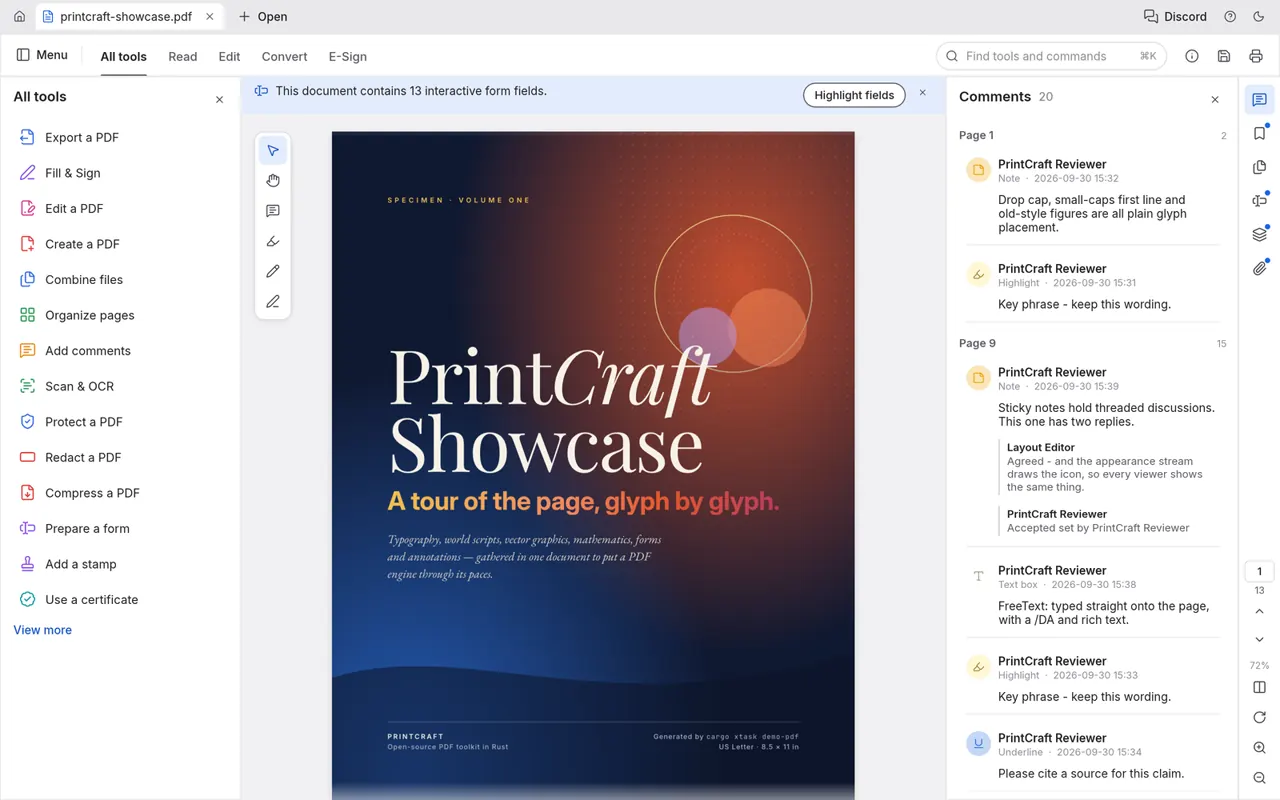
PdfCraft displaying a PDF with tools, page content, and threaded comments
Official PdfCraft project screenshot. View source ↗

PdfCraft features worth testing first.

PdfCraft is an early-stage application. Viewing and page operations may be useful today, while reliable text editing, broad OCR, prepress, accessibility, Office conversion, advanced signatures, and hostile-file hardening still require careful testing.

Read, navigate, and search in PdfCraft

Open PDFs, move through pages and layouts, zoom, search text, use bookmarks, inspect document properties, and work in light or dark viewing modes. Rendering fidelity should be checked on forms, transparency, unusual fonts, complex vectors, and very large files.

Organize document pages in PdfCraft

Combine, extract, split, rotate, reorder, and select pages while carrying document structures where supported. A successful operation is not enough: reopen the saved file, follow links and bookmarks, and run a PDF checker when the document matters.

Review, fill, and protect in PdfCraft

Comments, annotations, forms, signatures, permissions, redaction, sanitization, and security workflows are part of the project's scope. Legal, regulated, and confidential documents require independent verification of every destructive or trust-bearing step.

Automate bounded PDF work in PdfCraft

The CLI exposes inspection and document operations, while optional MCP and UI control paths allow scoped automation. Run agents against copies in explicitly allowed folders, and inspect the final PDF visually and structurally before distribution.

A useful PdfCraft trial uses several small PDFs rather than a single clean brochure: one scanned document, one form, one commented review, one file with bookmarks and links, one encrypted file you are authorized to open, and one print-ready document. View, search, organize, annotate, save, close, reopen, and inspect each output in a second reader.

PDF is a delivery format with many hidden structures. A page can look correct while tags, fields, links, signatures, permissions, color intent, or accessibility data are damaged. For casual organization, visual review may be enough; for legal, print, archival, security, or accessibility work, pair PdfCraft with the specialized validators required by that workflow.

Download PdfCraft from the official source.

This independent guide does not host installers. The buttons below open the project's GitHub pages, where the maintainers publish assets, checksums, release notes, source code, and known limitations.

  • Use the official storytold/pdfcraft Releases page; some older entries may appear under the former PrintCraft name.
  • Select the correct platform build and read the release notes for rendering, OCR, forms, signing, and printing limitations.
  • Work on a duplicate PDF and verify the saved document in another trusted reader before sharing or deleting the source.

Validate PdfCraft, not just the download.

PDF acceptance should match the consequence of failure. For ordinary reading, test search, bookmarks, links, annotations, printing, and complex fonts. For office documents, add forms, attachments, comments, signatures, and page reordering. For sensitive or regulated work, independently verify encryption, permission changes, redaction, sanitization, accessibility, archival conformance, and prepress output with the tools required by your organization. Save every trial under a new filename, reopen it in more than one reader, and compare the page count, visible content, selectable text, metadata, and interactive objects. PdfCraft may already cover a useful local workflow, but no single successful document proves that an entire document class is safe to migrate. Include a scanned document, a form with calculations, a file containing uncommon embedded fonts, and a document with internal destinations in the sample set. Print or export selected pages, copy text, follow links, and inspect file properties after saving. These checks catch rendering and structural changes that may remain invisible during a quick visual review.

PdfCraft vs Adobe Acrobat Pro: what changes?

This is a workflow comparison, not a claim of complete feature parity. Use the final column as a test plan before moving real work.

AreaPdfCraftAdobe Acrobat ProWhat to verify
Viewing and navigationPdfCraft offers a native viewer, layouts, search, bookmarks, panels, and page navigation with an open implementation.Acrobat Pro has decades of document compatibility work and widespread use across business and regulated environments.Open the same difficult PDFs and compare rendering, search, links, fonts, layers, forms, and responsiveness.
Page organizationCombine, split, extract, reorder, and related page operations are central PdfCraft workflows.Acrobat Pro provides mature page organization plus integrations and established recovery expectations.Save a copy, reopen it elsewhere, and confirm bookmarks, destinations, attachments, fields, and page labels.
Editing and conversionExisting-content editing and several create or export paths remain less mature, especially for complex text and Office-oriented workflows.Acrobat Pro has broader commercial tooling for text editing, conversion, scanning, and document production.Judge the exact edit or conversion required; a viewer and organizer is not automatically a full authoring replacement.
Security and complianceEncryption, permissions, redaction, sanitization, forms, and signatures are in scope, with known depth gaps documented publicly.Acrobat Pro is established in signing, preflight, accessibility, standards, enterprise administration, and online services.Use independent validation and organizational policy for signatures, redaction, archival, print, and accessibility.
Automation and ownershipOpen code, CLI tools, command scripts, and optional MCP support enable inspectable local automation.Acrobat combines desktop tools, APIs, cloud services, integrations, and commercial support.Choose the system whose output can be verified and whose failure path your organization can support.

Comparison sources: the official PdfCraft repository, its public roadmap, and the official Adobe Acrobat Pro product page. Product behavior changes; verify the current release before publishing a conclusion.

Should you use PdfCraft now?

The honest answer depends on the cost of a failed import, edit, save, handoff, or export—not on how similar the interface looks.

A practical fit

Try PdfCraft when…

  • People who need an open-source PDF reader with page organization and review tools.
  • Linux or FreeBSD users exploring a native alternative for everyday document work.
  • Developers building bounded, reviewable PDF inspection or batch-operation workflows.
A reason to wait

Keep Acrobat Pro in the loop when…

  • Legal, regulated, archival, print, or accessibility workflows without independent validation.
  • Users who require mature OCR, Office conversion, advanced signatures, preflight, or reliable existing-text editing.
  • Anyone planning to process untrusted documents without backups and current security review.
Use a reversible migration.

Keep originals, duplicate the working file, record the application and release used, compare exports in an independent viewer, and retain the old tool until the complete delivery loop has passed. A successful first launch proves installation; it does not prove compatibility, recoverability, or production readiness.

PdfCraft questions before you download.

Short answers for the decisions that should happen before an installer reaches your production machine.

Is PdfCraft the same project as PrintCraft?

Yes. The official roadmap records that PrintCraft was renamed PdfCraft. Older release entries may still carry the former name, while the current repository, binaries, and user-facing name use PdfCraft.

Where can I download PdfCraft?

Use the official storytold/pdfcraft GitHub Releases page. This independent guide does not host, alter, or mirror the files.

Can PdfCraft replace Acrobat Pro?

It can cover some viewing, organizing, review, and local automation tasks. Acrobat replacement depends on editing, OCR, forms, signatures, security, accessibility, prepress, integrations, and validation requirements.

Is PdfCraft safe for confidential PDFs?

Open source improves inspectability but does not remove operational risk. Use a current release, work on copies, limit automation permissions, follow your organization's policy, and independently verify redaction, encryption, signatures, and sanitization.