SolidCraft. Open-source parametric 3D CAD.

SolidCraft is an open-source parametric 3D CAD application built in pure Rust and maintained by Tangency Labs. It runs as a desktop application on Windows, macOS, Linux, and FreeBSD; it also provides a browser build, a headless command-line interface, and an MCP server for bounded agent workflows. The project is dual-licensed under MIT or Apache-2.0 and is currently described by its maintainers as an early release that is usable for simple parts.

Status
Early release
Maintainer
Tangency Labs
Language
Rust
License
MIT OR Apache-2.0
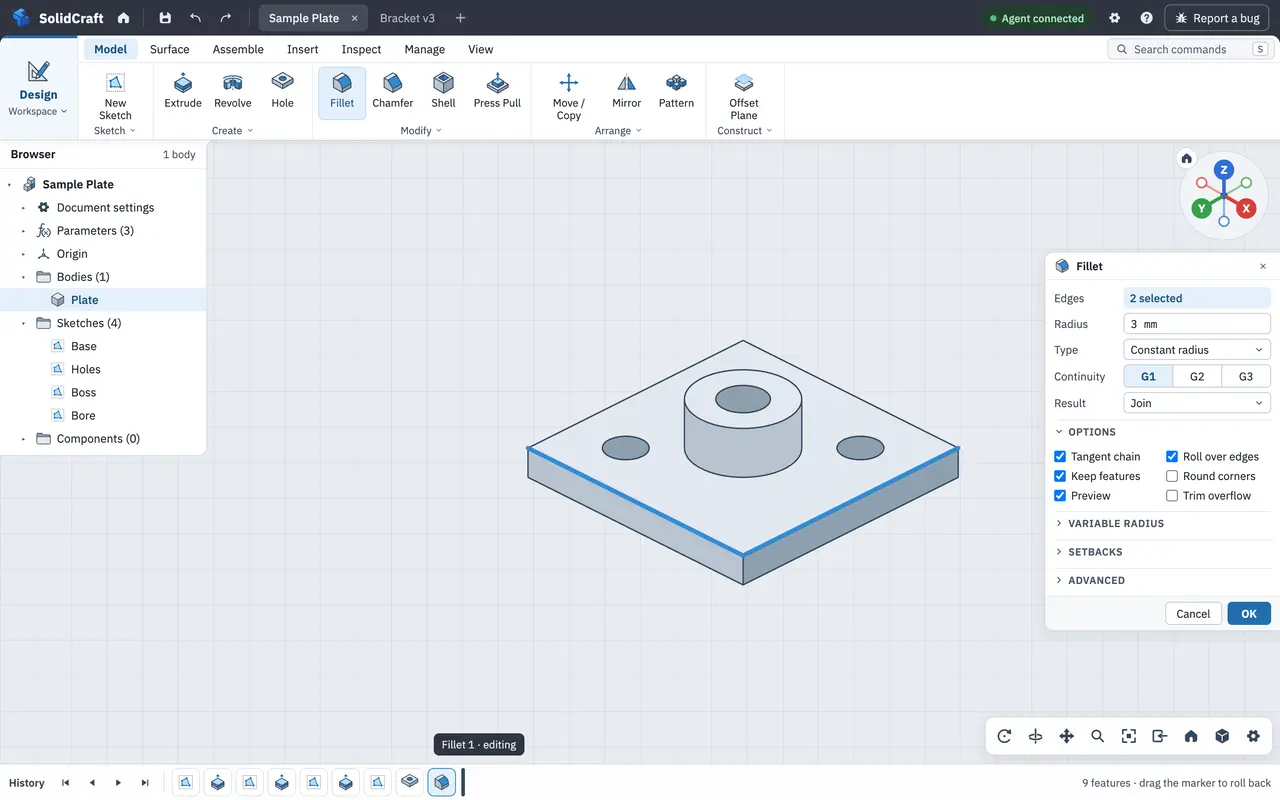
SolidCraft parametric CAD interface editing a sample part with the browser and feature history visible
Official project screenshot. View source ↗

What is SolidCraft?

This is not a download directory or a GitHub wrapper. It is a working CAD application whose source, roadmap, releases, issues, and engineering decisions are published in the open.

Parametric modeling

The modeling workflow starts with sketches, geometric constraints, dimensions, named parameters, and a feature timeline. A user can edit an early dimension and ask the model to rebuild downstream extrudes, revolves, sweeps, lofts, fillets, chamfers, shells, holes, patterns, mirrors, splits, and combines. That history-based behavior is the central meaning of parametric CAD here; it is more specific than simply drawing or pushing a mesh.

Desktop, web, and automation

The same project spans native desktop applications, a self-hosted browser build, a headless CLI, JSON command scripts, and an MCP server. Those surfaces make the application relevant to makers, developers, educators, open-source contributors, and teams testing reviewable automation. They do not make generated geometry automatically safe for manufacturing; measurements, constraints, tolerances, materials, loads, and downstream processes still require qualified review.

Open development

Tangency Labs maintains the current repository at tangency-labs/solidcraft. The codebase is written in Rust, while the repository exposes release history, pull requests, issues, a public roadmap, compatibility notes, capabilities, build instructions, and test evidence. The official README offers the project under MIT or Apache-2.0, at the user's option, with third-party notices retained separately.

Early-release boundaries

The maintainers call the application early but usable for simple parts. That wording matters. It supports a real trial without claiming parity with a mature commercial CAD, CAM, CAE, PDM, drawing, simulation, or supplier ecosystem. A useful evaluation begins with a disposable part and ends only after save, reopen, parameter edit, rebuild, neutral-format export, independent measurement, and recovery tests all pass.

Platform, license, language, status, and capability statements were checked against the official README, roadmap, and capabilities document on 2026-10-24.

What the parametric loop means in practice

A serious trial starts before the first feature is created. Write down the intended units, key dimensions, relationships, materials, and acceptance measurements. Build the sketch so its degrees of freedom are visible, name the parameters that drive the design, and add features in an order another person can follow. The goal is not only to reach the desired shape; it is to leave a model whose intent remains understandable when an earlier value changes.

Next, change a driving dimension near the beginning of the timeline. Watch every dependent sketch and feature rebuild. Inspect warnings instead of dismissing them, confirm that body count and assembly placement remain correct, and compare volume, area, centre of mass, and bounding dimensions with values recorded outside the application. This is where parametric CAD earns its value: a controlled change should update the model without silently changing unrelated intent.

Finally, save, close, reopen, and export a neutral format. Inspect that export in an independent viewer and preserve the application version with the result. SolidCraft exposes enough of this loop through its interface, command system, CLI, and MCP server to support repeatable tests. The open implementation makes investigation easier, but it does not replace dimensional inspection, engineering judgment, manufacturing review, or a recovery plan for important work.
Use SolidCraft GitHub as the source of truth.

GitHub belongs in this guide as evidence: use it when you need the repository, releases, issue history, roadmap, source, or a specific commit—not as a replacement for the product name.

The repository is especially useful when a feature name sounds familiar but the implementation depth is unclear. Search the README and capabilities document, then follow the linked issue or pull request. A checked box in a roadmap can establish that a path exists; it cannot establish that your assembly, imported topology, drawing standard, plug-in, machine, or manufacturing process will work without qualification.

The public release history also makes change visible. Release notes state which design format a version writes, which older versions can reopen it, what changed in geometry or interaction, and which packages were published. Preserve the release number with every important design. When an automated workflow matters, preserve the command script and exported measurements as well, so a later build can be compared against the same inputs.

Current release evidence

The official stable release checked on 2026-10-24 is v0.21.0, published on 2026-10-24. It writes design file format 34; the release notes warn that 0.20.0 and earlier cannot open designs saved by 0.21.0. The official install notes also state that the builds are not signed yet.

Stable release
v0.21.0
Published
2026-10-24
Design format
34
Signing
Not signed yet

Basic MCP configuration

The official MCP server starts with solidcraft-cli mcp. Headless mode owns its own design session; when a running desktop application is available, the CLI can discover its local control channel or connect to a named port. Start with a disposable design and an explicitly allowed folder. Inspect each command, measurement, save location, and export before trusting an agent-produced model.

This JSON is the minimal client configuration published in the official MCP documentation. Install the CLI first, make sure the executable is available on the client's PATH, then restart the MCP client after saving its configuration.

Read the official MCP documentation ↗
mcp.json
{
  "mcpServers": {
    "solidcraft": {
      "command": "solidcraft-cli",
      "args": ["mcp"]
    }
  }
}

For file operations, add only the folders the agent needs with --allow-path. Avoid --allow-any-path unless unrestricted access is genuinely required and separately controlled.

Questions before you adopt it.

Use these answers to decide what to verify in the repository and in your own files.

What is SolidCraft?

It is an open-source parametric 3D CAD application written in Rust. It combines sketches and constraints, a rebuildable feature timeline, solids and surfaces, assemblies, file exchange, a desktop interface, a browser build, a CLI, and an MCP server.

Where is the official SolidCraft GitHub repository?

The official repository is tangency-labs/solidcraft. Use that repository for source code, issues, the roadmap, release notes, checksums, and current documentation rather than an old mirror or copied installer link.

Which license does the project use?

The official README states that the application is available under MIT OR Apache-2.0 at the user's option. Third-party code and assets retain their own licenses and attribution.

Is the application ready for production CAD work?

The maintainers describe the application as early but usable for simple parts. Treat that as a starting point, then validate the exact geometry, file exchange, drawings, automation, recovery, manufacturing, and collaboration steps your work requires.