SolidCraft vs Fusion. Compare the whole workflow.

A useful SolidCraft vs Fusion comparison is not a checklist of similarly named commands. It asks whether the complete job survives: sketch, parameter edit, rebuild, assembly, file exchange, drawing or manufacturing handoff, automation, review, recovery, and long-term ownership. SolidCraft offers an open Rust codebase, local workflows, a browser build, CLI, scripts, and MCP. Autodesk Fusion offers a mature commercial environment spanning more of the product-development chain.

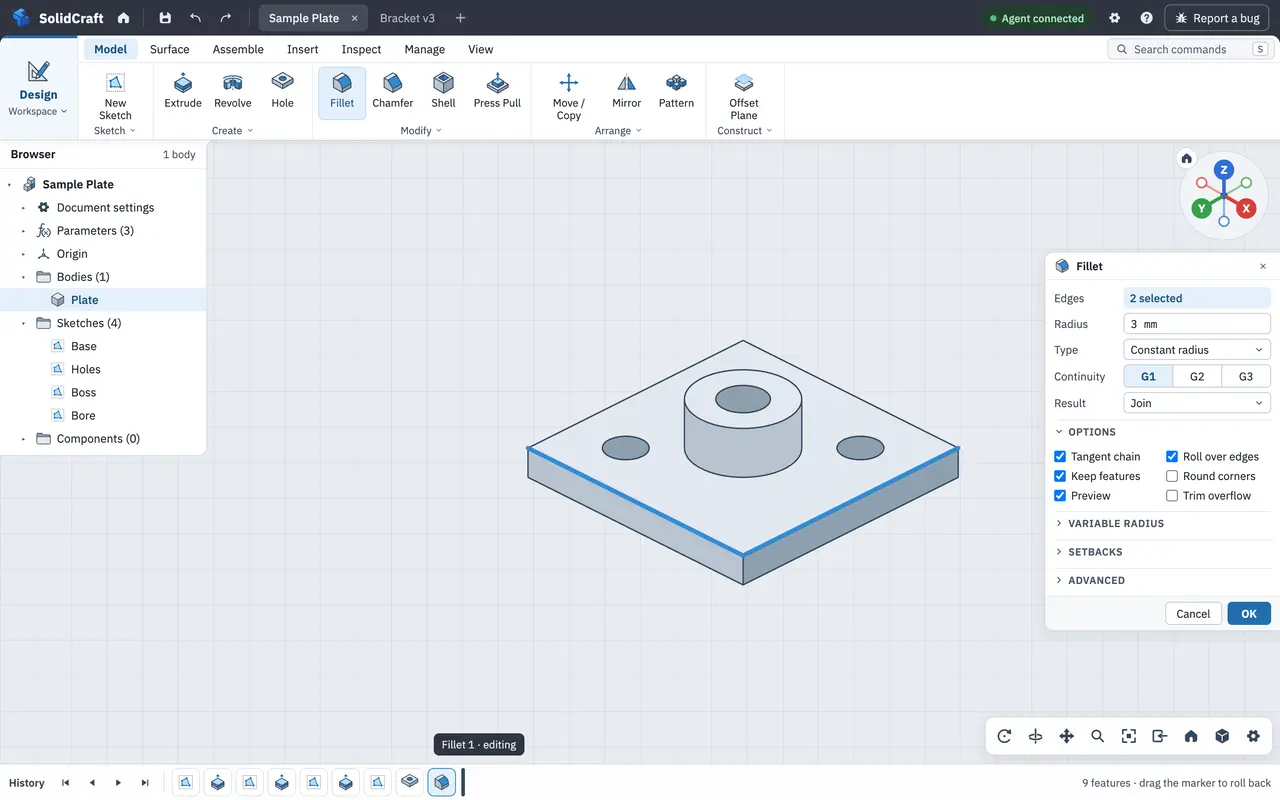
SolidCraft parametric CAD interface editing a sample part with the browser and feature history visible
SolidCraft interface shown for workflow context; this guide is not affiliated with Autodesk.

What SolidCraft vs Fusion actually compares

The applications overlap in parametric CAD, but they differ in maturity, ecosystem, delivery surface, ownership, support, and the breadth of surrounding professional workflows.

SolidCraft's proposition

SolidCraft is an open-source parametric 3D CAD application written in Rust and maintained by Tangency Labs. It targets constrained sketches, a rebuildable feature timeline, solids, surfaces, assemblies, common exchanges, desktop and browser operation, plus inspectable automation through scripts, CLI, and MCP. The maintainers describe it as early but usable for simple parts, so a comparison must keep current limitations visible.

Fusion's proposition

Autodesk Fusion is a commercial product-development platform. Its value is broader than a modeling toolbar: mature parametric and direct modeling, assemblies, drawings, simulation, CAM, electronics, data management, cloud collaboration, translators, extensions, training, and professional adoption. The relevant question is not whether SolidCraft resembles Fusion, but which parts of that complete environment the user actually needs.

SolidCraft vs Fusion workflow comparison

Read the final column as an acceptance plan. A controlled trial with representative files is stronger evidence than either product's feature list.

AreaSolidCraftAutodesk FusionWhat to verify
Parametric modelingSolidCraft provides constrained sketches, named parameters, unit-aware expressions, configurations, and an editable history timeline across common solid and surface features. Its open repository exposes implementation and known limits.Autodesk Fusion combines parametric and direct modeling across solid, surface, freeform, and mesh workflows, with mature editing behavior and commercial product support.Rebuild the same dimension-driven part. Compare constraint feedback, reference stability, feature failures, editing speed, undo, recovery, and the final measured body.
Assemblies and motionSolidCraft documents components, occurrences, joints, motion studies, contact sets, interference checks, materials, and mass properties. Current depth and open issues remain visible in its roadmap.Fusion integrates assemblies, joints, motion, collaboration, drawings, simulation, and broader product-development workflows in a cloud-connected environment.Test nested components, repeated parts, joints, limits, clearances, update propagation, mass properties, and a handoff to drawing or manufacturing.
File exchangeSolidCraft supports STEP, IGES, 3MF, STL, OBJ, glTF, DXF-related paths, URDF, and its own design format where documented. Editability and history preservation vary by format.Fusion supports a broad commercial translator ecosystem plus native, neutral, mesh, drawing, and manufacturing exchanges used across professional pipelines.Move one representative assembly both ways. Check units, names, colors, components, analytic faces, topology, missing references, metadata, and export logs.
AutomationSolidCraft exposes JSON command scripts, a headless CLI, browser commands, and an MCP server that uses the same command surface as the application. Open code makes the control path inspectable.Fusion offers APIs, add-ins, scripts, cloud services, integrations, and established professional automation patterns backed by Autodesk's platform.Repeat one automated build from clean folders. Compare command logs, allowed paths, output files, measurements, failure rollback, credentials, and human approval points.
Manufacturing workflowSolidCraft focuses on modeling, measurement, exchange, rendering, and automation. Do not assume that early-release coverage replaces an integrated production CAM, CAE, drawing, PDM, inspection, or certification chain.Fusion combines CAD with CAM, CAE, electronics, drawings, data management, collaboration, and manufacturing-oriented services or extensions.List every drawing, tolerance, simulation, toolpath, inspection, revision, supplier, approval, and archive requirement before changing the system of record.
Ownership and supportSolidCraft is open source under MIT or Apache-2.0 at the user's option. Teams can inspect, build, adapt, self-host the web build, and follow public issues, but they also own more qualification and support work.Fusion is proprietary commercial software with subscriptions, cloud-connected services, vendor support, training, integrations, and a large professional ecosystem.Compare total workflow cost: licensing, hardware, storage, migration, training, support, downtime, compliance, integrations, and the staff required to maintain custom automation.

Sources checked 2026-10-24: the official SolidCraft repository, SolidCraft roadmap, SolidCraft capabilities, and the official Autodesk Fusion product overview. Recheck both products before making a production decision.

Run a fair SolidCraft vs Fusion test.

A repeatable SolidCraft vs Fusion test separates preference from evidence and prevents one clean demo file from standing in for an entire engineering workflow.

  1. Choose a representative model.

    The SolidCraft vs Fusion sample should be a bracket, enclosure, fixture, or small assembly that contains the constraints, parameters, imported geometry, repeated components, fillets, shells, joints, and neutral exports your work actually uses. Keep the expected dimensions and mass properties outside both applications.

  2. Rebuild from an early change.

    In both sides of the SolidCraft vs Fusion trial, edit a driving parameter near the beginning of the history. Record broken references, warning quality, bodies created or removed, recovery steps, and whether the final measurements still match. A fast first model matters less than a model that can be changed safely six months later.

  3. Move files through the real handoff.

    Export the format required by a collaborator, supplier, drawing process, simulation, CAM tool, or archive. Open it independently and compare units, topology, names, colors, components, metadata, analytic surfaces, and watertightness. Native project portability and neutral geometry exchange are separate requirements.

  4. Test automation under limits.

    Repeat one build through SolidCraft scripts or MCP and the corresponding Fusion automation path available to the team. A SolidCraft vs Fusion automation result should preserve commands and outputs, introduce a deliberate error, and verify rollback, error messages, review points, and reproducibility from a clean folder.

  5. Price the whole operating model.

    Close the SolidCraft vs Fusion test by including subscriptions or support, migration, training, hardware, cloud or local storage, integrations, staff time, custom automation maintenance, downtime, security review, compliance, and supplier expectations. Open-source licensing can reduce one category of dependency while increasing qualification work elsewhere.

Choose SolidCraft or keep Fusion?

The right answer follows the consequence of failure and the breadth of the workflow.

A practical SolidCraft fit

Try SolidCraft when…

  • You want open-source parametric CAD for learning, making, research, or controlled internal tools.
  • Your work centers on simple or moderate parts whose geometry and exports can be independently checked.
  • Linux, FreeBSD, self-hosted web, command-line, scripting, or MCP access materially improves the workflow.
  • Your team can read issues, preserve versions, qualify releases, and support its own migration or automation choices.
A reason to retain Fusion

Keep Fusion in the loop when…

  • Production depends on mature drawings, CAM, simulation, electronics, translators, cloud collaboration, PDM, or supplier conventions.
  • Complex assemblies, deadline-critical work, certification, or safety consequences leave little room for early-release defects.
  • Employees, customers, educators, or partners require Fusion-native projects, add-ins, training, or vendor support.
  • The organization cannot own the testing, security, maintenance, and support burden of an open automation stack.
Use a reversible SolidCraft vs Fusion decision.

Keep the source-of-record system, originals, exported checkpoints, and acceptance measurements until the entire delivery loop passes. A successful SolidCraft trial can justify a bounded workflow without requiring a company-wide replacement. A failed trial can still reveal which open-source capability or automation surface is worth watching.

SolidCraft vs Fusion questions.

Short answers for choosing a test, not declaring a universal winner.

Can SolidCraft replace Autodesk Fusion?

A SolidCraft vs Fusion decision can favor the open application for some parametric modeling, assembly, exchange, scripting, and automation jobs. A full replacement depends on the exact drawings, CAM, simulation, electronics, collaboration, data management, translators, support, and compliance steps used by the team.

Is SolidCraft better than Fusion for automation?

A SolidCraft vs Fusion automation test should compare the open command system, CLI, scripts, and MCP with Fusion APIs, add-ins, integrations, and commercial support. Better depends on security, reproducibility, required features, and who maintains the workflow.

Which application should a beginner learn?

Choose the tool that matches the work and the people you must collaborate with. SolidCraft can be valuable for open-source learning and controlled experiments. Fusion may be a safer fit when a course, employer, supplier, drawing, CAM process, or support chain already depends on it.

How should a team test SolidCraft vs Fusion?

Use the same representative part, assembly, import, edit, drawing or export, and automation task. Record time, failures, measurements, file fidelity, recovery, handoff quality, and missing steps. Keep the current production tool until the complete delivery loop passes.